Just wanted to share a great article on texting and HIPAA Compliance: Five Ways to Ensure Secure Text Messaging in Your Medical
Practice
Showing posts with label technology. Show all posts
Showing posts with label technology. Show all posts
9.04.2014


8.01.2013
Passing the Time on the T with JAAPA
So the PA Journal (JAAPA) now has an application for the iPad. It has been out for a while now and I really like it! I download the most recent journal and am able to read it on the T on the way to work. It is great... it helps me keep up on the newest issues and clinical articles. The only downside is that it is only for the iPad currently... sorry no iPhones or iPods.
If you are an AAPA member, you get the journal for free along with the free CMEs in each issue.
Down load it at the Apple App Store: Journal of the American Academy of Physician Assistants

If you are an AAPA member, you get the journal for free along with the free CMEs in each issue.
Down load it at the Apple App Store: Journal of the American Academy of Physician Assistants

5.30.2013
Free AAPA app
The AAPA has developed an app! They officially launched it at conference and I wanted to give you a little overview. Cost: FREE
 |
| Easily accessible links to JAAPA, PA Professional, the PA microsite, and Joblink! |
 |
| Keep up with the social media buzz and the trending #hashtags. |
 |
| Keep up with the latest news in the AAPA profession. |
5.06.2013
Old and New Blog Entries
 I have had several people email asking me to make it easier to find "old" posts. I have converted the dated section to include "Titles" as well. Hope this helps!
You can also look under the different "Themes".
If you aren't finding what you are looking for... shoot me and email and I will working on adding a post to answer your question.
Upcoming topics from emails received include the following:
-Suturing techniques
-Scubbing in for the 1st time
-Better note writing tips
-Making the best out of your rotations
-Important neurosurgical exam findings
5.05.2013
Blog for Women in Surgery
I recently came across this blog... seems to just be starting up, but has lots of promise. I've added it to my favorites list.


3.17.2013
Would You Treat People Differently If You Knew What They Were Thinking?
The Cleveland Clinic put together a pretty amazing video on "Empathy" - it addresses all of the different people, their thoughts, and issues -- Would you treat people differently if you knew what they were thinking?
This video can be viewed at: http://www.youtube.com/watch?feature=player_embedded&v=cDDWvj_q-o8
This video can be viewed at: http://www.youtube.com/watch?feature=player_embedded&v=cDDWvj_q-o8
1.30.2013
New PA Student Site
Check out the new microsite dedicated to PA Students! I was part of the team that worked hard to put this together and the AAPA was an integral part of giving us the funding to get this up and running. It is a "one stop shop" that was created BY PA students FOR PA students!

Check it out. Write a blog entry for the site. Submit a new scholarship that you found that is relevant. The continued success of the site is dependent on YOU the PA student to help keep it alive with content!
See the About Us section to know where to send your content!

1.01.2013
Do You Use Social Media?
Do you use social media personally or professionally? If the answer is yes to either, you should check out this recent JAAPA article on social media. As we all know, anything that goes up on the internet has an infinite lifespan. Think about protecting your personal life and career...
 |
| http://www.socialable.co.uk/ |
10.25.2012
Secrets of the Social Media Trade
I have received quite a few emails over the past few weeks asking me how I keep up with all of my social media outlets. I'm on Twitter, Facebook, Linked In, and obviously ...blogging. The secret is Hootsuite. Hootsuite is one of many free social media dashboards available today. I haven't tried any of the other ones so I'd be interested to hear if you have.
Why is Hootsuite the secret to my success? Because it allows me update ALL of my social media outlets at the same time. I can input a message once and send it to all outlets with one click. In addition, Hootsuite allows me to schedule messages to go out at any time in the future. This enables me to sit down once or twice a week and set up the majority of my postings for the week. This is an enormous time saver.
If you are looking for a way to save time, but keep all of your social media outlets up-to-date or if you are just starting up your social media endeavors- check out Hootsuite or another dashboard.

Why is Hootsuite the secret to my success? Because it allows me update ALL of my social media outlets at the same time. I can input a message once and send it to all outlets with one click. In addition, Hootsuite allows me to schedule messages to go out at any time in the future. This enables me to sit down once or twice a week and set up the majority of my postings for the week. This is an enormous time saver.
If you are looking for a way to save time, but keep all of your social media outlets up-to-date or if you are just starting up your social media endeavors- check out Hootsuite or another dashboard.

9.30.2012
Note Taking on Your iPad
I must confess upfront that I am a Mac-o-holic. If I'm not on my iPhone or my iPad, then I'm working on my MacBook. I've had several people ask me how I use my iPad to take notes - and until recently I didn't have a great answer. I primarily used it to read text books and articles - but now that I've discovered Notability, I also use it to take notes.
Notability is a pretty wonderful app with good ratings and I haven't been disappointed with it yet. Now, of course, every app has it's flaws... but for what I use it for - I love it. It allows you to write out your notes on a "sheet of paper" and create a PDF or email it to yourself. You can also import PDFs (great for note taking on PDF'd ppts that you get in class. With the current version you can only import PDFs, but they are working on adding .doc and .ppt files to the mix soon. It also syncs with Dropbox to back up all of your notes or import files.
I have added some screen shots below. I'd love to hear if anyone has found something better out there - shoot me and email or add a comment.
And best of all, as of now, the app is only 99 cents!

Notability is a pretty wonderful app with good ratings and I haven't been disappointed with it yet. Now, of course, every app has it's flaws... but for what I use it for - I love it. It allows you to write out your notes on a "sheet of paper" and create a PDF or email it to yourself. You can also import PDFs (great for note taking on PDF'd ppts that you get in class. With the current version you can only import PDFs, but they are working on adding .doc and .ppt files to the mix soon. It also syncs with Dropbox to back up all of your notes or import files.
I have added some screen shots below. I'd love to hear if anyone has found something better out there - shoot me and email or add a comment.
And best of all, as of now, the app is only 99 cents!
 |
| There are several customizable features - pen and highlighter color and thickness as well as the addition of voice notes. |
 |
| The mini window allows you to write smaller notes, thus getting more on each page (this will come in handy if you wish to print out your notes). |

Disclaimer: I was not asked to write this review, nor do I receive anything if you buy it. Just wanted to share!
9.14.2012
Is Twitter Worth it?
Great blog post on Academic Life in Emergency Medicine, topic = Twitter! How can Twitter help you as a PA student? Why bother getting involved in it? Is it a waste of time? Check out this blog to find out: Mini-Guide to Twitter: Why Should I Join?

You can find me on Twitter: @B_Belcher
Photo source: http://technmarketing.com/web/11-things-to-avoid-when-using-twitter/
9.09.2012
Have You Backed Up Your Data Lately?

Have you backed up your computer lately? If you are like me, the majority of your "PA life" is on your computer... notes, e-text books, audio recordings, resume, cover letters, fun pics documenting the year, etc... What would you do if you couldn't turn on your computer tomorrow? Personally, I'd cry. I bring this up because it happened to a couple of my classmates in PA school and I felt horribly for them. I think it only makes it worse when people say after the fact that they should have backed it up. Ha. Hindsight is 20/20. SO, here is my pitch to you to back your stuff up NOW.
If you have a Mac - life is easy. You just need an external drive that is bigger than your hard drive and Time Machine does all the hard work. You just need to remember to plug it in! It even reminds you every 10 days that you haven't backed up in a while.
Pro of Time Machine: it backs up your entire computer, including your operating system
Con of Time Machine: you are reliant on an external hard drive - if that fails - you're out of luck
If you have a PC or would like an alternate to Time Machine there are some online back up systems available. Carbonite, Mozy, Centurylink are a few of the more popular ones. I suggest Googling them to see which one fits your needs/budget.
Pro: Runs in the background and constantly keeps things up to date. File accessible from iPhone/iPad, etc.
Con: Cost. Carbonite runs about $153 for a 3 year subscription. Security. Each of these companies say that their information is super secure, but it is alway a little weird to give all of the information from your computer to an outside entity.
The last alternative is to back up your most beloved files on a CD or DVD.
Pro: Cheap.
Con: Limited space unless you use lots of CDs/DVDs to back up. Can be wasteful if you are changing your files regularly.
I am in no way, shape, or form receiving financial reimbursement from any of the online storage companies that I mentioned in this blog. Just some suggestions.
8.22.2012
My Blog, the Mobile Version (New)
The new mobile version of this blog is up and running! Bookmark it!

8.16.2012
Free Ophthalmoscope App
"The Virtual Ophthalmoscope is a free, educational resource for the
clinical ophthalmologist. The Virtual Ophthalmoscope features a library of more
than 50 clinical cases with high-quality, zoomable images and commentary
from a leading consultant ophthalmologist. Available on iPad and iPhone
This
app is provided as an educational service by Alcon UK. It is intended
for healthcare professionals only. Not for patient use."

8.07.2012
Free Medicine Courses
Tufts School of Medicine in Boston, MA offers lots of free classes via their open courseware site:
"For more than 100 years, Tufts University School of Medicine has been a national leader in education and research. It offers one of the most substantive and innovative medical curricula in the country. The school's internationally renowned researchers are closing in on many of humankind's most plaguing diseases with work that ranges from genetics and geriatrics to AIDS and Alzheimer's, from cancer and cystic fibrosis to biotechnical and pharmaceutical breakthroughs."

"For more than 100 years, Tufts University School of Medicine has been a national leader in education and research. It offers one of the most substantive and innovative medical curricula in the country. The school's internationally renowned researchers are closing in on many of humankind's most plaguing diseases with work that ranges from genetics and geriatrics to AIDS and Alzheimer's, from cancer and cystic fibrosis to biotechnical and pharmaceutical breakthroughs."

6.03.2012
ID iPad Application
Check out this application on the App Store:
 | IDdx: Infectious Disease Queries
USBMIS, Inc
Category: Medical
Updated: Mar 12, 2012
 |

Currently free on iTunes.
5.24.2012
DrawMD, Free iPad App (Patient Education)
One of my favorite parts of my jobs is educating patients about their medical troubles. Sometimes it is difficult to get the patient to visualize a specific surgery or procedure that you are about to perform. You end up drawing on a piece of paper or a white board (and it never really looks quite right!) DrawMD came out with an incredible app for the iPad. There are several different apps for different specialties such as ortho, OB/GYN, cardiology, general surgery, etc. You can sit with a patient with great pictures... explain the procedure, draw on the picture or add your own notes, and then send a copy to the patient or save it if you often explain the same procedure. The best part about this app is that it is FREE! See below for examples from the DrawMD - Cardiology.
 |
| There is a menu of different pics/procedures that are available. |
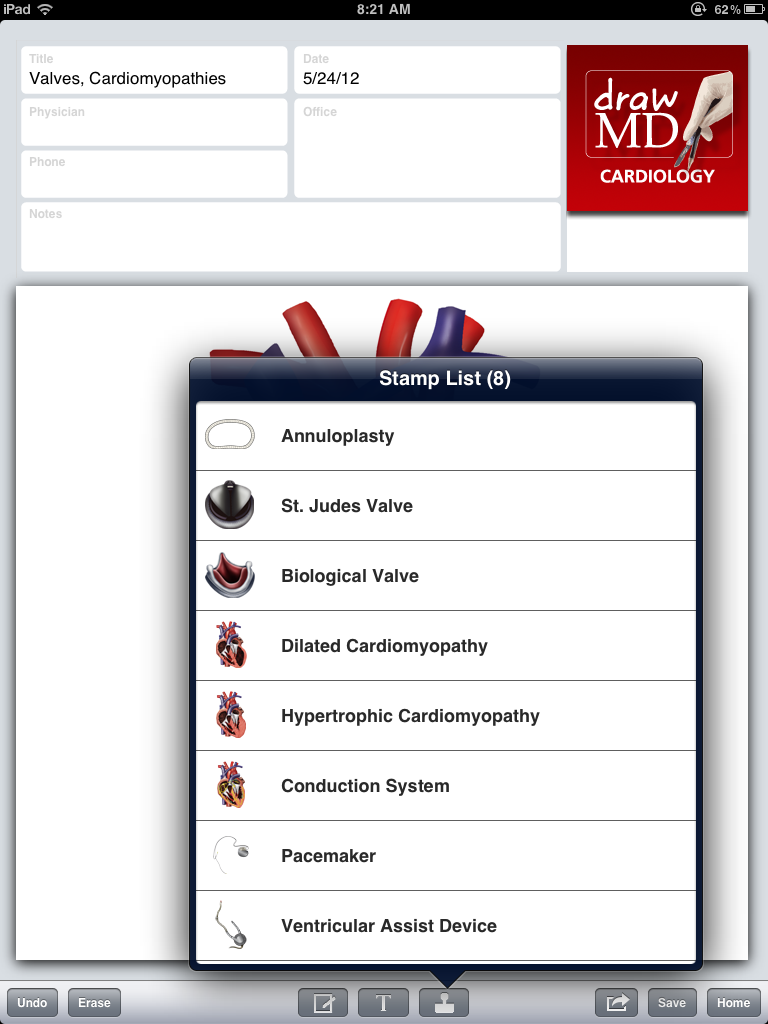 |
| Once you pick a general picture, there are picture "stamps" that you can add to describe procedures or anatomy. |
 |
| You can draw on the pics for effect. |
 |
| You can either write or type information on the picture. Then select the "SEND" key on the bottom right. |
 |
| Options for sending the image. |
 |
| You may save the final product to your library for future use. |
5.14.2012
Cardiothoracic Imaging Resource
Yale's Introduction to Cardiothoracic Imaging. It includes cardiothoracic anatomy, imagining, case, and reference resource. Very high quality.


4.30.2012
AANS YouTube Channel
The American Association of Neurosurgeons have put a great YouTube Channel that has educational videos including power points, surgical videos, and lectures. I've learned a lot from it. It is definitely worth checking out if you are interested in neurosurgery!


2.18.2012
What is a HSG?
Hysterosalpingogram. It doesn't roll off the tongue. Yesterday, during my OB/GYN rotation, I was able to watch two of these procedures and then perform the third. When the attending first asked me if I wanted to see a HSG with her - I have to be honest - I was thinking... "What is an HSG??"
What is a hysterosalpingogram (HSG)?
An x-ray (fluoroscopy) procedure performed to determine whether the fallopian tubes are patent and if there are uterine cavity defects. A radiographic contrast is injected into the uterine cavity via a small tube that is passed thru the vagina and cervix into the uterus. The uterine cavity is filled with dye and if the fallopian tubes are open... the dye will fill the tubes and eventually spill into the abdominal cavity (a good thing!)

What does an HSG help diagnose?
Primarily it is used as a test to determine the cause of infertility. It can also be used to evaluate the uterine cavity for the presence of congenital uterine anomalies, polyps, fibroids, tumors, and uterine scar tissue. The fallopian tubes are examined for pelvic scarring, blockages, or defects.
What are some of the risks to the patient?
1. Infection is the most common problem. It is recommend that the patient follow vaginal rest for 7-10 days (no sex, tampons, etc).
2. Mild discomfort during the procedure.
3. Small radiation exposure (less than a bladder or kidney study)
Images: http://www.drmalpani.com/hysterosalpingogram.htm
What is a hysterosalpingogram (HSG)?
An x-ray (fluoroscopy) procedure performed to determine whether the fallopian tubes are patent and if there are uterine cavity defects. A radiographic contrast is injected into the uterine cavity via a small tube that is passed thru the vagina and cervix into the uterus. The uterine cavity is filled with dye and if the fallopian tubes are open... the dye will fill the tubes and eventually spill into the abdominal cavity (a good thing!)

Primarily it is used as a test to determine the cause of infertility. It can also be used to evaluate the uterine cavity for the presence of congenital uterine anomalies, polyps, fibroids, tumors, and uterine scar tissue. The fallopian tubes are examined for pelvic scarring, blockages, or defects.
 |
| normal HSG |
What are some of the risks to the patient?
1. Infection is the most common problem. It is recommend that the patient follow vaginal rest for 7-10 days (no sex, tampons, etc).
2. Mild discomfort during the procedure.
3. Small radiation exposure (less than a bladder or kidney study)
Images: http://www.drmalpani.com/hysterosalpingogram.htm
Subscribe to:
Posts (Atom)